

redis是一个基于内存的高性能key-value数据库,具有极高的读写速度。本文介绍 SpringBoot 和 Redis 的整合,以及如何在项目中具体应用。
一、我的需求
1、实时快速获得动态数据
如图,下图中的通知数5和消息数8在每个页面都是有的,不可能每次都从 MySQL 数据库里查询一下吧(下拉的详细信息是点击事件后才ajax加载)。我们知道 MySQL 是从硬盘读取,Redis 是从内存读取,速度比较可想而知。
所以我们这里可以使用 Redis 数据库,第一次先把计数从 MySQL 查出来,然后放到 Redis 数据库里,下次直接从 Redis 数据库读取。张三给李四发一条消息,只需要给李四的 Redis 数据库里该 key 记录 + 1,李四读取了这条消息,只需要给李四的 Redis 数据库里该 key -1。


2、排行榜或推荐内容(每天变动一次或七天变一次)
比如我这里右边侧边栏有本周用户排行榜(按文章数排序),推荐关键词排行榜(按文章关键词次数排序),热门文章排行榜(按评论数点赞数访问数等加权排序)。MySQL查询到数据后,我们还有进行处理排序,时间比较长。如果我们第一次查询后,然后将现成的数据存到 Redis 数据库中,下次访问就很快了,无论用户如何刷新页面,加载都很快。
Redis 也可以设置缓存过期时间,比如用户排行榜设置1小时更新一次,推荐关键词只有增删改的时候才更新,热门文章2小时更新一次。

二、基本准备
1、本地安装了 Redis 数据库
Linux 或 Mac 可以参考这篇文章:点此
2、启动查看端口

3、下载可视化客户端 rdm
通常情况下,我们可以在命令行下查看 Redis 数据库,但是可视化工具能更真实地让我们看到数据的结构。

三、开始代码
注意:本文用的 Redis 数据结构都是 String 类型,没有用到 List 类型
本文使用的 SpringBoot 版本 1.5.9
如果你的是 2.0 版本,在 RedisConfig.java 需要修改一下序列化工具部分
1、Maven
<!-- 里面依赖了spring-data-redis -->
<dependency>
    <groupId>org.springframework.boot</groupId>
    <artifactId>spring-boot-starter-data-redis</artifactId>
</dependency>
2、封装 redisTemplate 工具类
package com.liuyanzhao.forum.util;

import org.springframework.beans.factory.annotation.Autowired;
import org.springframework.data.redis.core.StringRedisTemplate;
import org.springframework.stereotype.Component;

import java.util.Map;
import java.util.Set;
import java.util.concurrent.TimeUnit;

/**
 * @author 言曌
 * @date 2018/3/18 下午1:11
 */

@Component
public class RedisOperator {

//  @Autowired
//    private RedisTemplate<String, Object> redisTemplate;

    @Autowired
    private StringRedisTemplate redisTemplate;


    // Key(键),简单的key-value操作

    /**
     * 实现命令:TTL key,以秒为单位,返回给定 key的剩余生存时间(TTL, time to live)。
     *
     * @param key
     * @return
     */
    public long ttl(String key) {
        return redisTemplate.getExpire(key);
    }

    /**
     * 实现命令:expire 设置过期时间,单位秒
     *
     * @param key
     * @return
     */
    public void expire(String key, long timeout) {
        redisTemplate.expire(key, timeout, TimeUnit.SECONDS);
    }

    /**
     * 实现命令:INCR key,增加key一次
     *
     * @param key
     * @return
     */
    public long incr(String key, long delta) {
        return redisTemplate.opsForValue().increment(key, delta);
    }


    /**
     * 实现命令: key,减少key一次
     *
     * @param key
     * @return
     */
    public long decr(String key, long delta) {
        if(delta<0){
//            throw new RuntimeException("递减因子必须大于0");
            del(key);
            return 0;
        }
        return redisTemplate.opsForValue().increment(key, -delta);
    }


    /**
     * 实现命令:KEYS pattern,查找所有符合给定模式 pattern的 key
     */
    public Set<String> keys(String pattern) {
        return redisTemplate.keys(pattern);
    }

    /**
     * 实现命令:DEL key,删除一个key
     *
     * @param key
     */
    public void del(String key) {
        redisTemplate.delete(key);
    }

    // String(字符串)

    /**
     * 实现命令:SET key value,设置一个key-value(将字符串值 value关联到 key)
     *
     * @param key
     * @param value
     */
    public void set(String key, String value) {
        redisTemplate.opsForValue().set(key, value);
    }

    /**
     * 实现命令:SET key value EX seconds,设置key-value和超时时间(秒)
     *
     * @param key
     * @param value
     * @param timeout (以秒为单位)
     */
    public void set(String key, String value, long timeout) {
        redisTemplate.opsForValue().set(key, value, timeout, TimeUnit.SECONDS);
    }

    /**
     * 实现命令:GET key,返回 key所关联的字符串值。
     *
     * @param key
     * @return value
     */
    public String get(String key) {
        return (String) redisTemplate.opsForValue().get(key);
    }

    // Hash(哈希表)

    /**
     * 实现命令:HSET key field value,将哈希表 key中的域 field的值设为 value
     *
     * @param key
     * @param field
     * @param value
     */
    public void hset(String key, String field, Object value) {
        redisTemplate.opsForHash().put(key, field, value);
    }

    /**
     * 实现命令:HGET key field,返回哈希表 key中给定域 field的值
     *
     * @param key
     * @param field
     * @return
     */
    public String hget(String key, String field) {
        return (String) redisTemplate.opsForHash().get(key, field);
    }

    /**
     * 实现命令:HDEL key field [field ...],删除哈希表 key 中的一个或多个指定域,不存在的域将被忽略。
     *
     * @param key
     * @param fields
     */
    public void hdel(String key, Object... fields) {
        redisTemplate.opsForHash().delete(key, fields);
    }

    /**
     * 实现命令:HGETALL key,返回哈希表 key中,所有的域和值。
     *
     * @param key
     * @return
     */
    public Map<Object, Object> hgetall(String key) {
        return redisTemplate.opsForHash().entries(key);
    }

    // List(列表)

    /**
     * 实现命令:LPUSH key value,将一个值 value插入到列表 key的表头
     *
     * @param key
     * @param value
     * @return 执行 LPUSH命令后,列表的长度。
     */
    public long lpush(String key, String value) {
        return redisTemplate.opsForList().leftPush(key, value);
    }

    /**
     * 实现命令:LPOP key,移除并返回列表 key的头元素。
     *
     * @param key
     * @return 列表key的头元素。
     */
    public String lpop(String key) {
        return (String) redisTemplate.opsForList().leftPop(key);
    }

    /**
     * 实现命令:RPUSH key value,将一个值 value插入到列表 key的表尾(最右边)。
     *
     * @param key
     * @param value
     * @return 执行 LPUSH命令后,列表的长度。
     */
    public long rpush(String key, String value) {
        return redisTemplate.opsForList().rightPush(key, value);
    }

}
3、application.properties
#### Redis
# Redis数据库索引,默认为0
spring.redis.database=0
# Redis 服务器地址
spring.redis.host=127.0.0.1
# Redis 端口
spring.redis.port=6379
# Redis 密码,默认为空
spring.redis.password=
# 连接池中最大连接数(使用负值表示没有限制)
spring.redis.pool.max-active=1000
# 连接池中最大阻塞等待时间(使用负值表示没有限制)
spring.redis.pool.max-wait=-1
# 连接池中最大空闲连接
spring.redis.pool.max-idle=10
# 连接池中最小空闲连接
spring.redis.pool.min-idle=2
# 连接超时时间(毫秒)
spring.redis.timeout=0
4、RedisConfig.java
package com.liuyanzhao.forum.config;

import com.fasterxml.jackson.annotation.JsonAutoDetect;
import com.fasterxml.jackson.annotation.PropertyAccessor;
import com.fasterxml.jackson.databind.ObjectMapper;
import org.springframework.cache.CacheManager;
import org.springframework.cache.annotation.EnableCaching;
import org.springframework.context.annotation.Bean;
import org.springframework.context.annotation.Configuration;
import org.springframework.data.redis.cache.RedisCacheManager;
import org.springframework.data.redis.connection.RedisConnectionFactory;
import org.springframework.data.redis.core.RedisTemplate;
import org.springframework.data.redis.core.StringRedisTemplate;
import org.springframework.data.redis.serializer.Jackson2JsonRedisSerializer;

import java.util.HashMap;
import java.util.Map;


/**
 * @author 言曌
 * @date 2018/5/21 上午10:02
 */
@Configuration
//@EnableRedisHttpSession(maxInactiveIntervalInSeconds = 3600 * 12)//最大过期时间
@EnableCaching
public class RedisConfig {

    //缓存管理器
    @Bean
    public CacheManager cacheManager(@SuppressWarnings("rawtypes") RedisTemplate redisTemplate) {
        RedisCacheManager cacheManager = new RedisCacheManager(redisTemplate);
        //设置缓存过期时间
        Map<String, Long> expires = new HashMap<>();
        expires.put("7d", 7 * 3600 * 24L);
        expires.put("12h", 3600 * 12L);
        expires.put("1h", 3600 * 1L);
        expires.put("10m", 60 * 10L);
        cacheManager.setExpires(expires);
        cacheManager.setDefaultExpiration(7 * 3600 * 24);//默认缓存七天
        return cacheManager;
    }

    @Bean
    public RedisTemplate<String, String> redisTemplate(RedisConnectionFactory factory) {
        StringRedisTemplate template = new StringRedisTemplate(factory);
        setSerializer(template);//设置序列化工具
        template.afterPropertiesSet();
        return template;
    }

    private void setSerializer(StringRedisTemplate template) {
        @SuppressWarnings({"rawtypes", "unchecked"})
        Jackson2JsonRedisSerializer jackson2JsonRedisSerializer = new Jackson2JsonRedisSerializer(Object.class);
        ObjectMapper om = new ObjectMapper();
        om.setVisibility(PropertyAccessor.ALL, JsonAutoDetect.Visibility.ANY);
        om.enableDefaultTyping(ObjectMapper.DefaultTyping.NON_FINAL);
        jackson2JsonRedisSerializer.setObjectMapper(om);
        template.setValueSerializer(jackson2JsonRedisSerializer);
    }
}

四、简单的测试
新建一个控制器,测试一下之前封装的 RedisOperator
package com.liuyanzhao.forum.controller;

import com.alibaba.fastjson.JSON;
import com.liuyanzhao.forum.entity.Article;
import com.liuyanzhao.forum.entity.User;
import com.liuyanzhao.forum.repository.ArticleRepository;
import com.liuyanzhao.forum.util.RedisOperator;
import org.springframework.beans.factory.annotation.Autowired;
import org.springframework.web.bind.annotation.RequestMapping;
import org.springframework.web.bind.annotation.ResponseBody;
import org.springframework.web.bind.annotation.RestController;

import java.util.List;

/**
 * @author 言曌
 * @date 2018/3/18 上午11:18
 */

@RestController
@RequestMapping("/redis")
public class RedisController {

    @Autowired
    private RedisOperator redis;

    @Autowired
    private ArticleRepository articleRepository;

    @RequestMapping("/set")
    @ResponseBody
    public String set(){
        redis.set("name","琪仔");
        redis.incr("age",20);

        User user = new User();
        user.setId(234);
        List<Article> articleList = articleRepository.findAll();
        System.out.println(articleList);
        redis.set("json:articleList", JSON.toJSONString(articleList));


        return  "success";
    }

    @RequestMapping("/get")
    @ResponseBody
    public String get(){
        return redis.get("json:articleList");
    }


}
五、具体应用到项目中
1、Sevice 中统计某个用户未阅读的消息数量,并添加到Redis
@Override
   @Cacheable(value = "12h", key = "'messageSize:'+#p0.id")
   public Integer countNotReadMessageSize(User user) {
       return messageRepository.countByUserAndStatus(user, MessageStatusEnum.NOT_READ_MESSAGE.getCode());
   }
2、发布私信(好友的未读消息+1)
@GetMapping("/manage/messages")
   public ModelAndView messages( Integer uid) {
          ......
           // 查看好友发来的N消息,Redis中未读消息-N
           redisOperator.decr("messageSize:" + user.getId(), notReadSize);
          ......
   }
六、@Cacheable、@CachePut、@CacheEvict 注解的使用
@Transactional
    @Override
    //执行下面的方法,最终将结果添加(如果这个key存在,则覆盖)到Redis中
    @CachePut(value = "7d", key = "'tags:'+#p0.id", unless = "#tag eq null")
    public Tag saveTag(Tag tag) {
        return tagRepository.save(tag);
    }

    @Override
    //如果Redis数据库中没有这个key,执行下面方法,最终结果添加到Redis。如果key已存在,则直接从Redis获取,不执行下面方法
    @Cacheable(value = "7d", key = "'tags:'+#id.toString()")
    public Tag getTagById(Integer id) {
        return tagRepository.findOne(id);
    }

    @Override
    //condition为true执行@CacheEvict,将该key从Redis删除
    @CacheEvict(value = "7d", key = "'tags:'+#id.toString()", condition = "#result eq true")
    public Boolean removeTag(Integer id) {
        tagRepository.delete(id);
        return true;
    }
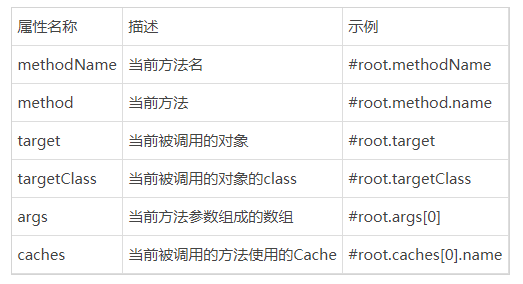
注意:key 必须为String类型, @Cacheable中不能使用 #Result
除了上述使用方法参数作为key之外,Spring还为我们提供了一个root对象可以用来生成key。通过该root对象我们可以获取到以下信息。
参考这里:https://www.cnblogs.com/fashflying/p/6908028.html

还木有评论哦,快来抢沙发吧~